CFL spent a decade as the steepest part of the Maker learning curve. For agents, it’s the part of Superhuman Docs that doesn’t guess, and that makes it the stronger foundation for an agent’s memory.
A note up front: I’m a Superhuman Docs beta tester and part of the Ambassador collective, but I don’t speak for Superhuman. Everything here is my own setup, my own tests, and my own opinion.
Most of us in this community learned CFL the hard way. thisRow, CurrentValue, Filter() chains, lookups that hand back rows instead of text, and action formulas that describe an action instead of doing anything until a button or automation runs them. It’s a real language, and for years it was the thing that separated Makers who built systems from Makers who built pretty tables.
AI flipped that. The learning curve that slowed humans down costs an agent a few thousand tokens of context. What’s left is a language with a published function list, typed values, and stable references to tables and columns, which an agent can write and the doc evaluates the same way every time. The burden became the asset.
That’s my claim in one line: for agent memory, Superhuman Docs is the more strategically advantageous platform, because CFL and Packs give agents a deterministic runtime that sits right next to the data. The rest of this post is the reasoning, the evidence, and the places where the claim stops being true.
It started as a reply on X. Someone said he was setting up a Notion brain, one system that works locally, in the cloud, and across agent harnesses. I replied that I’d done the same with Superhuman Docs, and that after testing both, two things decided it: a powerful and predictable formula language, and Packs, extensibility that plugs into the core of the product instead of hanging off the side.
If you read The Doc My Bots Remember With, you’ve seen the architecture: one doc, my Initiatives Hub, is the system of record for my Grok Bot fleet, one designated bot writes to it, and every write gets read back. I won’t repeat that tour. This post goes one layer down, to why the formula engine underneath matters more than the tour suggested, and how far the idea stretches on the Free plan.
Agents don’t mind syntax. They mind ambiguity.
Every step an LLM performs, it performs by generating tokens, and generation is probabilistic. Every step a formula performs, the doc performs by evaluating it, and evaluation isn’t. When an agent hands a step to the formula engine, that step stops being a guess.
I want to be careful with the word “deterministic.” CFL is deterministic in the way that matters: the same expression against the same doc state gives the same answer. It also has asterisks, and they’re documented, which is the point.
Evidence — What the Superhuman Docs API reference says about predictability:
- Volatile functions.
Now(),Today(), andUser()depend on when and who. Through the API, time-based values may only be current to the last edit, and user-based values may be blank.Random()andRandomItem()regenerate on edits by default (formula list).- Queued writes. A row write returns HTTP 202, “accepted and queued.” You confirm it landed with a mutation-status call.
- Snapshot reads. Reads come from a recent snapshot that can trail the browser by a few seconds. You can ask for the latest version and get an error if the API isn’t caught up.
None of that is a flaw. An agent that knows Now() is volatile keeps it out of a gate. An agent that knows writes are queued reads back before it reports success. Predictable doesn’t mean magical. It means you can know in advance what will happen.
Sub-conclusion — An agent’s memory should be built on a platform whose behavior is written down. CFL’s semantics, including its exceptions, are published, so an agent can be told the rules instead of discovering them by failing.
The test that made the point
On November 4, a Maker here reported something odd. An agent was passing two JSON strings from table cells into a Pack action. In one of three runs, one string arrived shorter, with fields missing. The other arrived at the same length with a different hash.
My fleet ran the experiment that morning on synthetic data. Store two JSON payloads in a table, read them back, then have a model pass them as tool arguments, the same way an agent fills a Pack formula’s parameters. Twenty runs per configuration, across a current Flash model and two cheaper “lite” models.
Evidence — My JSON pass-through test, November 4, 2026, synthetic data:
- The doc was exact. Both payloads round-tripped through the table byte for byte.
- The model was the wire, and the wire drifted. The current model was exact in 20 of 20 runs. One cheaper model drifted in 30% of runs: a literal backslash-n collapsed into a real newline, which still parses but means something different. The cheapest model drifted in 76% of valid calls, losing track of where one argument ended and the next began.
- Passing a reference fixed it. When the model passed only a row ID and the Pack fetched the cell itself, drift went to zero in 20 of 20 runs, with about 100 times fewer output tokens and roughly a tenth of the time.
- Checks detect but don’t repair. A length and hash check made every bad payload fail loudly. Retries never fixed one. The model that garbled a string kept garbling it.
That’s my X reply, measured. The LLM should decide what happens. It should not be the wire the data travels on. When the doc or a Pack moves the data, it arrives intact. When the model retypes it, it arrives probably intact, and “probably” is a terrible property for memory.
Sub-conclusion — The safest agent memory is one where the model passes references and the platform moves the bytes. Superhuman Docs can do that inside the doc, cell to Pack, with no model in the data path. That is a structural advantage, not a tuning trick.
Code mode, in a doc
There’s a pattern spreading through agent tooling called code mode. Instead of having the model perform a task step by step through tool calls, you let it write a small program and hand that program to something that runs it exactly. The model chooses the work. The runtime does the work.
CFL is a code-mode runtime that already lives next to your data. An agent can compose an expression at runtime, something like Initiatives.Filter(Status = "Active" and NextGate < Today() + Days(7)).Count(), and the doc computes the answer. The model never counts rows, never paraphrases a status, and never summarizes what it hopes is in the table.
My rule is simple: the LLM decides what to run, and the doc executes it predictably. Then the agent reads the result back before it says anything.
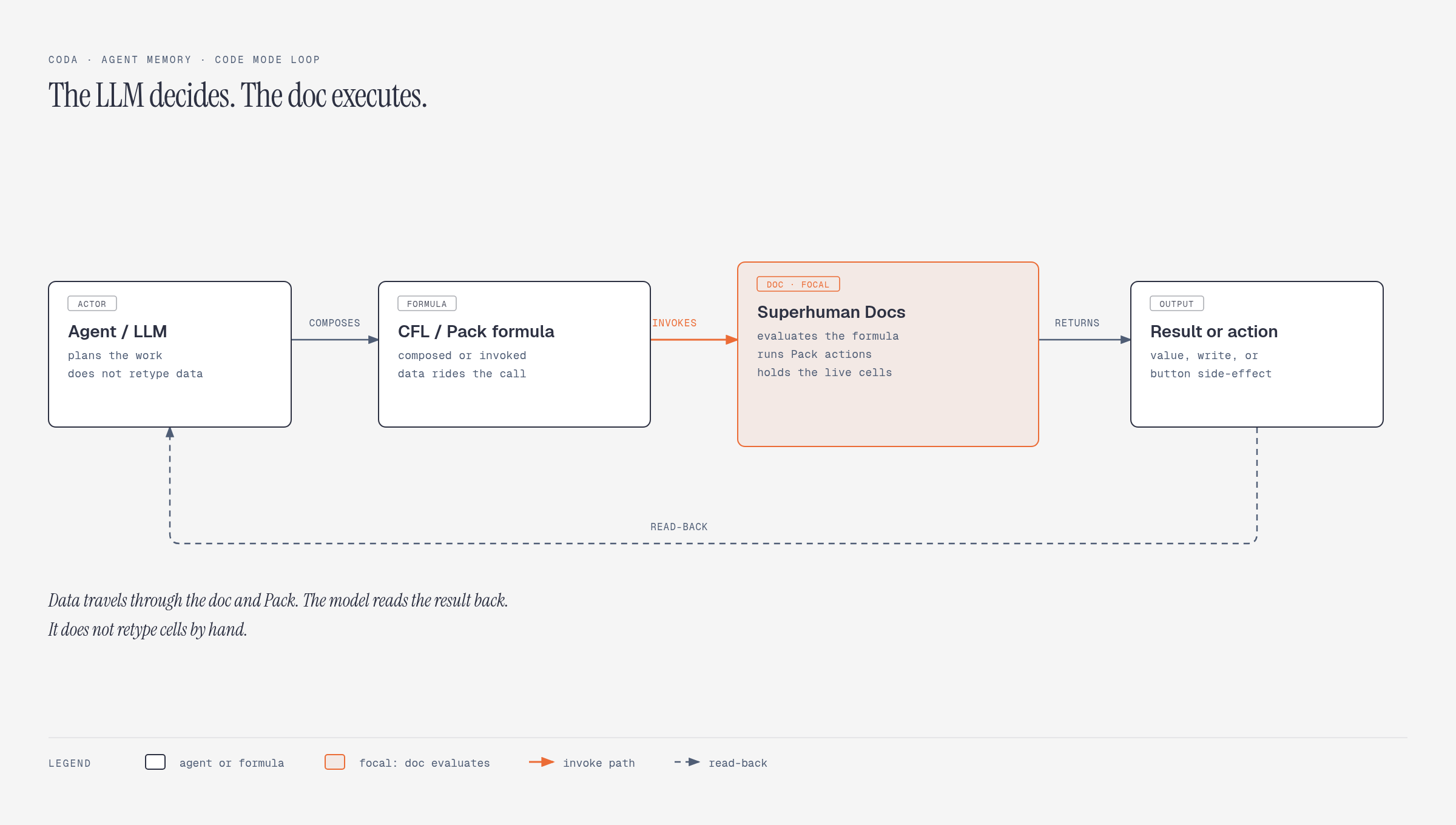
Figure 1. The LLM decides. The doc executes. The agent composes a CFL expression or picks a button, Superhuman Docs evaluates it against live tables, and the agent reads the result back before it reports.
The obvious question is how much of that loop works today, so I checked. This is where code mode is real and where it stops, as of November 5, 2026.
Through the Docs MCP
The Docs MCP help page lists “writing and executing formulas” among its abilities, and the MCP acts as you, checked against your own access on every request. Here’s what my bots’ connector actually did.
Evidence — Docs MCP probes against a test doc, November 5, 2026:
- Evaluate any formula.
formula_executeevaluated a CFL expression and returned the exact count and string length.- Install formulas that persist.
table_columns_manageadds or updates a column’s formula.control_managecreates formula controls and buttons, including a button’s action formula and its disable-if formula. An agent can leave behind deterministic logic that keeps working after the chat ends.- Actions are described, not run. Evaluating
AddRow(...)throughformula_executereturned an action value, a description of the row it would add, and the table’s row count stayed at one.- No trigger tool found. I found no connector tool that presses an existing button, and none that creates or lists automations. The help page says “creating and triggering controls and buttons.” I found the creating half, not the triggering half. Tool names are still changing, so this may be ahead of my connector. I’m reporting what I observed, not ruling it out.
Through the REST API
Evidence — What the REST API reference and its OpenAPI spec document, checked November 5, 2026:
- Write cells, and let formulas follow. Insert, upsert, and update endpoints write base-table values, and dependent formulas recompute. Per the automations help, row-changed triggers fire on direct, button-generated, and API edits, not on formula-populated columns.
- Push a button.
pushButtonpresses a button in a row’s button column. The reference says that button “can perform any action on the document, including writing to other tables and performing Pack actions.”- Trigger an automation.
triggerWebhookAutomationfires an existing webhook-invoked rule with a JSON payload. You create the rule in the doc. I found no public endpoint that creates, edits, or lists rules.- Read formulas, don’t author them. Named formulas return computed values. Column endpoints are GET-only. There’s no endpoint to create a column, set a column formula, evaluate an arbitrary expression, or call a Pack formula from outside the doc.

Figure 2. Where code mode is real today. The Docs MCP composes and evaluates formulas and installs buttons. The REST API writes cells, pushes buttons, and fires webhook automations. The full loop needs both.
So the complete deterministic loop exists, but it’s split across two surfaces. The MCP lets an agent compose formulas and install buttons. The REST API lets something press them. With both, the agent decides and the doc executes, all the way through. With only the MCP, an agent can calculate anything but can’t fire an action directly.
There’s a documented middle path. Row-changed automations fire on API edits, so an agent can write a trigger value to a row and let the automation run the action. Speculation: whether an MCP write counts the same way, I haven’t verified. The help page names API edits, not MCP edits, so treat it as a likely path, not a finding. Each of those runs also counts against the event-based automation quota, which matters on Free.
My own fleet sits on the MCP side of that line on purpose. The machine my bots share holds no Docs API token, so no script there can reach the Hub on its own. That costs me the button-pushing half of code mode. I think it’s the right trade for a system of record, and I’d rather name the gap than hide it.
Sub-conclusion — Code mode in Superhuman Docs is real today for computing, and real for acting if your harness can reach the REST API. The gap is between two official surfaces of one product, not a missing capability. That’s a much shorter road than building a formula runtime from scratch.
Packs extend inward
Most platforms extend sideways. You get an integration that syncs data into a table, or a webhook that calls your code, and the logic lives somewhere else.
Packs extend inward. A Pack sync table is a real table that formulas can filter. A Pack formula is called like any built-in. A Pack action can sit behind a button with a disable-if formula, so the doc decides whether the action is even available. Your own TypeScript becomes vocabulary in the formula language, not a separate system the formula language has to call.
From the Packs SDK and Superhuman help:
- Pack formulas join CFL. Once a Pack is installed, its custom formulas can be used “anywhere, intermingling them with built-in formulas or those from other Packs.”
- Actions always run. Pack actions are never cached and run every time a button is pressed or an automation fires.
- Same Pack, two products. A Pack works in Superhuman Go and Superhuman Docs. In Go, actions are exposed as tools an agent can call.
- Free to build. The Pack Studio guide says a free account makes you a Doc Maker in your personal workspace, which is all it takes to build and install your own Pack.
That’s the fix for the JSON drift above. The deterministic version is a button whose action formula is something like BuildSchema(thisRow.claimant_json, thisRow.rotation_json). The doc passes the cell values. No model retypes them. The agent’s job shrinks to deciding when the button runs, which is the job it’s good at.
Sub-conclusion — Packs make your own code a first-class part of the doc’s deterministic runtime, on every plan. For agent builders, that means one language for data, logic, and actions, and one place to audit what ran.
Jev handles the judgment formulas can’t
The objection I hear most: real work needs judgment, and formulas don’t have any. Is this message urgent? Which bot should take this handoff? Is this draft ready for review?
True. But most of those questions are narrow. They aren’t “write me an essay.” They’re “pick one of these four,” “score this on a five-point scale,” or “yes or no.” For those I use Jev, the System One model from TypeSafe. Jev doesn’t write prose. It takes state and a typed question (choice, score, or noul, a probability of yes) and returns a typed answer with probabilities. My bots reach it through an MCP connector and a small command-line wrapper.
The fleet’s rule: rules first, Jev for the residue, and code applies the thresholds. If an exact match or a routing rule decides, Jev never gets called. If Jev is confident enough, the bot acts. If it isn’t, the bot reads a short list or asks me. Jev never approves anything that sends, posts, deletes, or spends.
Evidence — My fleet’s Jev logs:
- November 2 through 4, 2026: 117 logged Jev decisions. 66 were acted on, 23 narrowed to a short list, and one fell back when Jev wasn’t reachable.
- Shadow-mode sync gate, November 3: asked “has anything changed enough to sync?” on an hourly index sync, Jev would have skipped 9 of 13 runs. The sync reported changes after all 9. On paper, nine false exits and an easy no-go.
- The catch: the gate’s deterministic signals, file times and new or missing files, also said nothing had changed, while the sync reported the same 40 files changed every hour. Either the sync redoes work or the gate reads its log wrong. Calls took about 240 milliseconds each.
So I can’t enforce that gate until the ground truth makes sense. A typed judgment is cheap, but it’s only as good as the facts you feed it and the outcome you grade it against. Facts belong to code. Judgments belong to Jev. Neither belongs to the chat model.

Figure 3. The probabilistic part keeps shrinking. The chat model plans, Jev makes small typed judgments, and CFL and Packs do the arithmetic, filtering, and writes.
Sub-conclusion — A formula substrate is what lets the rest of the stack get smaller. When CFL and Packs own facts and actions, the only model calls left are narrow, typed, and gradable. That’s cheaper, easier to test, and far easier to trust than a chat model doing everything.
Why this matters across harnesses
My bots don’t all live in one harness. Most of the fleet is Grok Bot. Muse, Meta’s personal agent, runs on my Mac and trades job files with Ria, my coordinator bot. Muse doesn’t touch the Hub today; it works through files and a doorbell. I want it to read from the Hub eventually, under the same MCP rules as everything else.
That’s the case for a formula language as shared memory. Harnesses will keep changing. Models will keep changing. A formula that counts active initiatives gives Grok Bot, Muse, or whatever comes next the same answer, because the doc computes it, not the agent. Memory that lives in prose has to be reinterpreted by every new reader. Memory that lives in typed tables, with formulas computing the derived parts, doesn’t.
My Hub already works this way in small ways. Bots never write to formula columns. They check the schema first, write source cells by column ID, and read the row back. When a computed value looks wrong, they repair the formula or the source cell that feeds it, never the computed cell. None of that depends on which model holds the pen.
Sub-conclusion — Durable memory should outlive the agents that use it. Logic that lives in the doc is portable across harnesses and models by default. Logic that lives in prompts has to be rebuilt for every new agent.
Fair to Notion
Notion is a serious option for agent memory, and I don’t want to win this by pretending otherwise. It’s also further along than I first gave it credit for.
Evidence — Where Notion is ahead, from its MCP tool list and help center:
- Agent-native MCP. Tools include a memory search for preferences and decisions saved by connected agents, Custom Agent sessions you can start and query, Skills, and a version-changes tool that shows whether an edit came from a person, AI, or an MCP client. That provenance is something I’d love in my Hub.
- SQL over databases. Notion’s MCP can run read-only SQL against data sources, and a multi-source tool runs one read-only SQLite query across 2 to 100 of them. Per its database tools reference, cross-source SQL requires Business or Enterprise with Notion AI, and other plans share a per-workspace allowance for single-source SQL. That’s a real deterministic query path.
- Code extensibility. Notion Workers, in beta, are hosted TypeScript programs that sync data, receive webhooks, and give Custom Agents new tools. They’re available on Business and Enterprise.
- A capable formula language. Notion formulas have
map,filter,let, and relation traversal.
Here’s where I think the difference is real.
Evidence — Where the platforms differ:
- Where formulas live. Notion formulas are database properties, computed per page. CFL lives in columns, on the canvas, in controls, and in action formulas behind buttons and automations. The language that calculates is also the language that acts:
AddRow,ModifyRows,RunActions, and Pack actions.- Read versus act. Notion’s MCP SQL is read-only. The Docs MCP evaluates arbitrary CFL and installs formulas and buttons that keep running.
- Extensibility tier. Packs can be built and used on Free. Notion Workers need Business or Enterprise.
- Automations on Free. Superhuman Docs Free includes a monthly automation quota. Notion’s automations help says Free gets Slack-notification automations only.
- API throughput. Notion allows 180 requests per minute per connection below Business and 600 on Business and Enterprise, plus a plan-scaled workspace limit and about 3 data-source queries per second (request limits). Superhuman Docs publishes the same per-user limits on every plan. They’re measured differently, so neither is simply bigger. Superhuman Docs’ limits just don’t change when you pay.
If your agents mostly need searchable prose, session history, and a vendor-run agent, Notion is a good fit. If they need a substrate they can program against, one that computes, acts, and runs your own code inside the same language, that’s why I chose Superhuman Docs.
Sub-conclusion — Notion is building toward agents with queries, sessions, and Workers. Superhuman Docs already has the piece that’s hardest to add later: one formula language that reads, computes, and acts, extended by Packs, available on every plan.
The Free-plan margin
The natural follow-up is whether this works without paying. Mostly yes, with sharp edges. Every number below is from the official pricing page (also served at superhuman.com/plans/docs) and help center, checked November 5, 2026.
Evidence — What works on Free:
- Personal docs have no object or row limits. An unshared doc can have as many pages, tables, and rows as you like (Doc limits on Free plan).
- The REST API is free, at the same rate limits as paid plans. 100 reads per 6 seconds, 10 writes per 6 seconds, and 4 doc listings per 6 seconds, per user (Overview: Doc limits). Doc-content writes are listed as 3 per 10 seconds in the help center and 5 per 10 seconds in the API reference. Plan for 3.
- Formulas, automations, and your own Packs all work, within the quotas below.
Evidence — Where Free breaks for an agent fleet:
- The MCP is a taste. Free members and Editors get up to 30 MCP requests a week, with a maximum of 60 a month (Using the Docs MCP). A working fleet can use that up in a morning, so on Free, agent memory has to run on the REST API with your own token, rate limiting, and retries.
- Sharing changes the limits. Once a Free doc is shared with anyone, including by link or folder, it’s capped at 50 objects and 1,000 table rows. Go over and you get 14 days to upgrade or trim before the doc goes read-only. A busy agent log can hit 1,000 rows fast.
- Automations are metered. 35 time-based and 100 event-based runs per month, per doc. Row-changed, form-submitted, and webhook-invoked runs all count as event-based.
- Pack sync tables are small and manual. 100 rows per sync table, including Cross-doc, with manual refresh only. Daily refresh starts at Pro, hourly at Business.
- History is short. 7 days of version history.
- Size ceilings apply on every plan. Docs over 125 MB, not counting attachments, may lose API access. Over 325 MB, formulas stop calculating until the doc shrinks.
The practical Free setup: keep the agent memory doc personal, archive old rows to a second doc, and don’t hang an automation off every write.
Evidence — The next step up. Pro is $12 per month, billed per Doc Maker; Editors and viewers are free (billing basics). Pro removes page and object limits on shared docs, raises automations to 100 time-based and 500 event-based runs per month per doc, gives Pack sync tables 10,000 rows with daily refresh, keeps 30 days of history, and includes MCP access for Doc Makers. Superhuman says paid MCP limits “are high and should not interfere with reasonable usage,” but doesn’t publish a number.
Notion’s Free tier has a comparable edge. A Free workspace with more than one member gets 1,000 lifetime blocks, and deleting blocks or emptying the trash doesn’t lower the count (block usage). The REST API began enforcing that limit on September 1, 2026, with a three-day grace period (workspace block limits, changelog). Single-member Free workspaces are unlimited. Notion Free keeps 7 days of page history, and Plus, at $10 per member per month, keeps 30 (pricing).
Sub-conclusion — For one person and one agent, Superhuman Docs Free is a genuine agent-memory platform: unlimited personal docs, the full REST API, CFL, automations, and your own Packs. For a fleet, the first wall is the MCP taste, and the first fix is a single Pro Doc Maker seat, not an enterprise contract.
The doc doesn’t guess
The X reply was short because the idea is simple. Agents are good at deciding what to do and unreliable at doing exact things over and over. A formula language is the opposite. Put them together, keep a typed judgment model like Jev for the narrow calls in between, and the probabilistic part of the system shrinks to the part only it can do.
For a decade, CFL asked Makers to think like programmers. Now the programmers are agents, and the doc is the runtime they’ve been missing.
If you’re running agents against your own docs, I’d love to hear where code mode works for you and where it stops. Especially if you’ve found the MCP’s button-trigger path.
Bill French
Sources
Checked November 5, 2026, unless noted.
Superhuman Docs: plans and limits
- Superhuman Docs pricing, also at superhuman.com/plans/docs. Free $0, Pro $12 per month, Business $33 per month; “Limited for shared docs” on Free; manual connector refresh on Free.
- Overview: Doc limits. Shared Free caps, automation quotas, Pack sync rows and refresh, version history, API rate limits, 125 MB API and 325 MB formula ceilings.
- Doc limits on Free plan. What counts as sharing, the 14-day grace period, and read-only lock.
- Superhuman Docs billing and pricing basics. Coda became Superhuman Docs on July 8, 2026; only Doc Makers are billed.
- What’s changing: Coda becomes Superhuman Docs. Docs, Packs, automations, and formulas continue to work; existing API endpoints continue.
Superhuman Docs: MCP, API, automations, and Packs
- Using the Superhuman Docs MCP. Writing and executing formulas; creating and triggering controls and buttons; Free “taste” of 30 requests per week, 60 per month; paid Doc Maker limits “high.”
- Control what the Docs MCP can access. The Docs MCP acts as you.
- API reference and OpenAPI spec. Queued writes, snapshot reads, volatile formulas,
pushButton,triggerWebhookAutomation, GET-only columns, no formula-evaluate endpoint, doc-content writes at 5 per 10 seconds. - Automations in Superhuman Docs. Row-changed triggers fire on direct, button, and API edits, not formula columns.
- Create webhook-triggered automations.
- Formula list and Basics of formulas. Action formulas and volatile functions.
- Overview: Use Packs in Superhuman Docs.
- Packs SDK, formulas guide, actions guide, and Pack Studio guide.
Notion
- Notion pricing. Plus at $10 per member per month; page history; Custom Agents on credits.
- Notion MCP tools and database tools reference. Memory search, sessions, version changes, and read-only SQL.
- Run custom code with Workers and Workers overview. Business and Enterprise.
- Database automations, formula syntax, and understanding block usage.
- Workspace block limits, changelog, and request limits.
My own work
- The Doc My Bots Remember With, Superhuman Community, November 3, 2026.
- My X reply, November 5, 2026.
- My tests and logs: the JSON pass-through test (November 4, 2026, synthetic data),
formula_executeprobes (November 5, 2026), Jev decision logs (November 2 to 4, 2026), and shadow-mode sync gate results (November 3 to 4, 2026).