A tough-love deep dive into the latest usability refresh.
Coda, the beloved LEGO® set for doc-nerds and spreadsheet-despisers, just got a makeover. On the surface, it’s all minimalist chic, consolidated menus, and a clean aesthetic that practically begs for mainstream approval. But don’t be fooled by the fresh coat of paint. Beneath it lies a strategic pivot, a calculated neutering that should make every power user deeply suspicious despite their equally intense love for this platform. I know. I am this user. A maker from the beginning and an advocate for a technically competent tool that blends text, imagery, AI, and data - all in a single platform that can be used to build polished domain-specific solutions.
Nothing about today’s UX refresh prevents me from continuing to use Coda as I always have. But there are non-trivial changes that impact my seemingly irrational devotion.
The question isn’t whether the new UI is prettier—it is. The real question is whether Coda, in its bid for mass-market appeal under the new Grammarly empire, is sanding down the sharp, powerful edges that made it essential, leaving a lobotomized tool that’s friendly to everyone but truly less useful to Makers who create streamlined workflows and use Coda as a business solution platform.
The Grammarly Imperative: Why Your Coda Is Being Dumbed Down
Let’s be brutally honest: this UI refresh isn’t some benevolent act of design altruism. It’s a cold, hard business move, a direct consequence of Coda’s assimilation by Grammarly. Facing an existential crisis as LLMs make its core spell-check business seem quaint, Grammarly is frantically assembling a Voltron of productivity apps. It grabbed Superhuman for email, and it swallowed Coda for its collaborative canvas.
It’s Not Email; Its a Story
December 19, 2024
Read full story
The endgame is an “AI agentic platform,” a utopian vision where AI agents work together in a unified space. But to sell this dream to Grammarly’s 40-million-plus daily users—an audience far broader and less technical than Coda’s “maker” cult—Coda had to be declawed. This refresh is Step One in domesticating the wild beast Coda once was, making it safe and palatable for the masses. It’s a strategic necessity for Grammarly, but it feels like a tragic dilution for Coda’s most loyal builders who probably weren’t paying the bills anyway.
This UI refresh is therefore a strategic necessity to lower the barrier to entry… It prioritizes approachability for new users, sometimes at the expense of power-user efficiency.
A Tour Through the ‘Improved’ Coda: Hits, Misses, and Outright Insults
Coda’s announcement is a festival of corporate buzzwords like “focus” and “clarity.” Let’s translate that marketing fluff into reality and see who wins and who loses.
Blank Doc Experience: A Quieter, More Patronizing Welcome
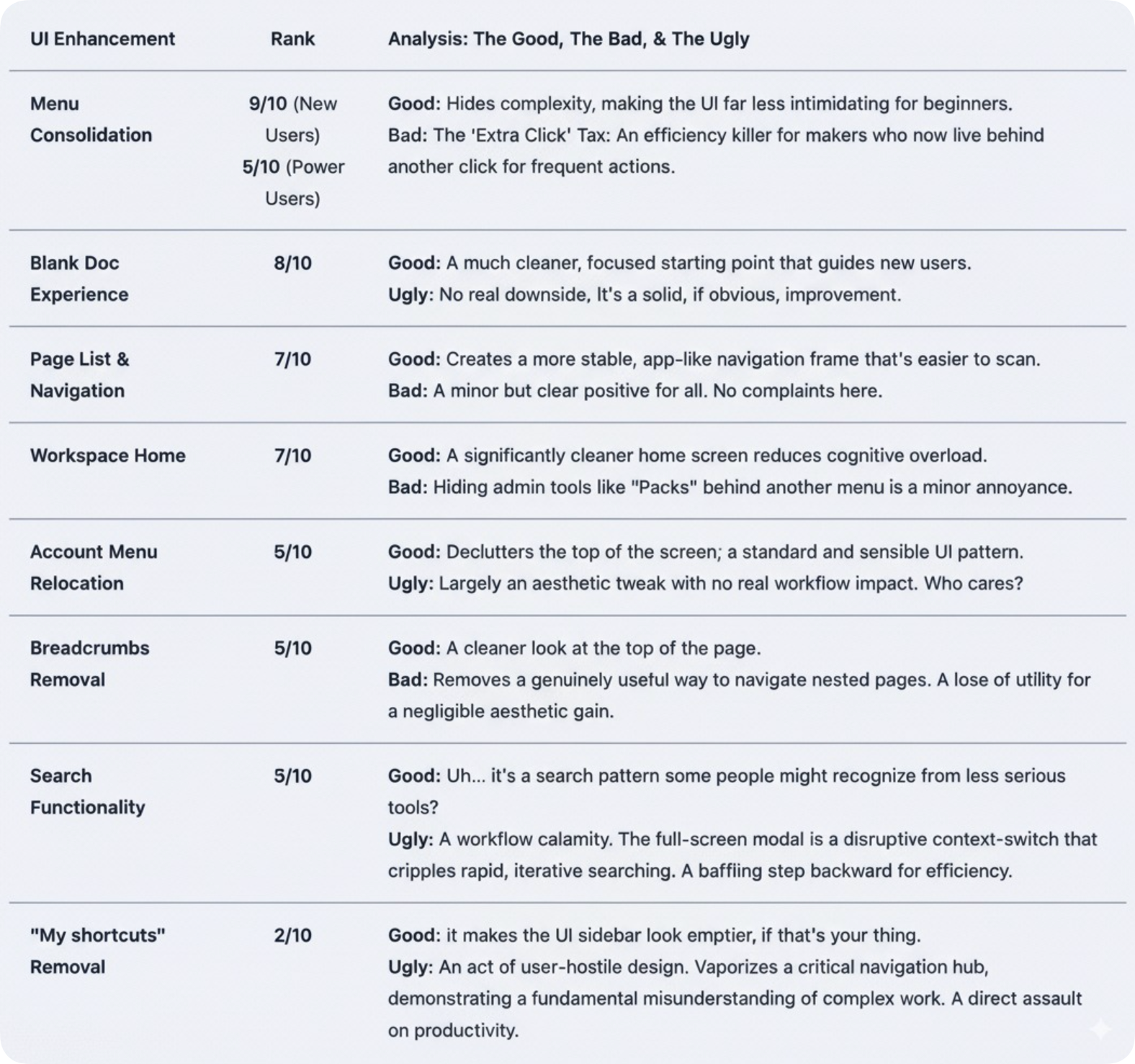
The chaotic template tray is gone from the blank doc view. Newcomers now see a clean slate and an “Insert Panel” pointing them toward basic blocks. This is an undeniable win for first-timers, who are no longer hit with a paralyzing wall of options. For power users? It’s a shrug. A perfectly logical, if uninspired, change. I like it. Most Makers probably won’t. Moving on.
Menu Consolidation: The Ministry of Hidden Options
Doc Settings, Page Options, and Table Options have been neatly tucked away into single “Options” menus. Visually, it’s a minimalist triumph. Functionally, it’s a death by a thousand papercuts. For the “makers” who live in these menus, this introduces a small but infuriating “extra click” penalty. Each click is a micro-interruption, a tiny grain of sand in the gears of a complex workflow that, over a day, accumulates into a mountain of friction.
Search: A Jarring Act of Disruption
The ever-present, top-center search bar is gone. To find something, you now click a left-panel icon, summoning a full-screen modal that yanks you out of your flow like a poorly timed pop-up ad. This is perhaps the most egregious offense against power-user muscle memory. The old search was immediate and in-context. The new search is a disruptive, screen-hogging event. It’s the digital equivalent of having to get up and walk to a different room just to ask a question—a design pattern that is objectively slower for rapid work.
“My shortcuts” Removal: Organizational Vandalism
In a move that feels like a direct slap in the face to anyone who values organization, the “My shortcuts” panel has been vaporized. This was the user-curated command center for navigating complex workspaces. Its removal is a high-risk gamble that demolishes ingrained workflows and forces reliance on the whims of “Recents.” It’s a baffling act of organizational vandalism, sacrificing user agency for a misguided sense of “cleanliness.”
The Ranking: A Brutally Honest Scorecard
Here’s how the new UI features stack up when you peel away the marketing veneer. We’ve ranked each change by its real-world impact, striking a balance between catering to new users and supporting the workflows of seasoned pros.
What The Makeover Doesn’t Fix: The Rot Under the Floorboards
Here’s the most essential truth of all: this UI refresh is cosmetic surgery on a patient with systemic organ failure. While Coda has been busy rearranging the deck chairs, the engine room has been flooding.
The community’s biggest complaints have nothing to do with the search bar’s location. They’re about foundational problems that make Coda unusable at scale.
-
Performance & Scale: Users consistently report that as docs grow, Coda slows to a pathetic crawl. Tables with a few thousand rows become unresponsive. The
125MBAPI limit is a hard ceiling that forces serious teams to abandon Coda’s data layer entirely. -
API Reliability: The API is seen as a “major single point of failure.” Teams that build critical infrastructure on Coda simply don’t trust it.
-
A Ghost Town Mobile App: The mobile experience isn’t just bad; it’s an embarrassing, forgotten relic. In an age of hybrid work, it’s a critical failure.
As one user bluntly stated, their engineering team’s only solution from Coda was “to move our data to another platform.” When your vendor’s advice is to use another product, you don’t have a product; you have a billboard for your competitors.
Conclusion: A Fork in the Road for Coda’s Soul
The Coda UI refresh is a logical, well-executed maneuver to prep the product for the mainstream objectives under the Grammarly banner. It succeeds in making Coda look simpler. But this veneer of simplicity is paid for with the currency of power-user efficiency, and it deliberately ignores the foundational rot that actually threatens the platform. I get it. There are many gears and dependent cogs that must be aligned to tackle the architectural hurdles necessary to scale.
The changes reveal a company at a crossroads. Will it chase the mass market by continuing to blunt its features, becoming a prettier but dumber-by-default version of its former self? Or will it use its new war chest—a rumored $1 billion—to finally fix the deep-seated issues of performance, scale, and reliability that its most loyal users are screaming about?
Coda’s Future Demise
November 25, 2024
I predicted Coda’s demise in early 2024. Not the actual date, but the likely eventual demise. I questioned the AI strategy and told the Codans to pump the breaks. But my deeper predictive senses about the future were captured in an article never published.
Read full story
Today’s UX refresh might attract new eyeballs, but Coda’s reputation was built on the backs of “makers” who pushed it to its limits. By disrupting their workflows while ignoring their cries about the platform’s core failures, Coda risks alienating the very community that gave it a soul. And a soul-less tool, no matter how pretty, is just another disposable app in a graveyard of good intentions.
It’s possible the Maker era was never financially sustainable, or in light of the rapid advance of generative AI, the Maker cult is destined to be vaporized. I’m pragmatic about the end of everything. Perhaps this step is a harbinger of AI disruption.


