Hello, I’m working on creating a pack with authentication and fetching data from API, for successful response API requires custom authentication header, I’m quite confused about what to use for my case
right now it’s
for now authentication code is like this
pack.setUserAuthentication({
  type: coda.AuthenticationType.CustomHeaderToken,
  headerName: "Authorization",
  tokenPrefix: "Token",
  endpointDomain: "${ENDPOINT_DOMAIN}",
  instructionsUrl: "${INSTRUCTIONS_URL}",

  // Determines the display name of the connected account.
  getConnectionName: async function (context) {
    let url = "${API_URL}"
    let response = await context.fetcher.fetch({
      method: "GET",
      url: url,
    });
    return response.body.first_name;
  },
});
and I’ve got
 execute: async function ([id], context) {
      let secretHeader = "Authorization  {{" + context.invocationToken + "}}";

      // I need header here, but in debug panel nothing seen

      let response = await context.fetcher.fetch({
      method: "GET",
      url: "${API_URL}",
      headers: { "Authorization": secretHeader}
    });
      let requestRes = response.body
      console.log(requestRes)
      let result = [];

      return {
        result: result,
      };
    },
how should I implement authentication and data fetching to add custom header to requests?
Hi @andreysukhov90 - Your authentication configuration looks correct, and it should cause the following header to be added to outgoing requests automatically:
Authorization: Token {USER_TOKEN}
As for you execute code, you shouldn’t need to set any headers at all. You seem to be using the pattern required for Custom authentication, which is different than CustomHeader authentication.
I’d recommend removing the all of the authentication and header code from your execute function and see if it works.
Hi Eric
tried it, but it didn’t work for me, headers are still not there
does customHeader strategy assumes that custom headers would automatically be added to each request? seems to me it doesn’t work like that
Ya, that’s how all of our authentication schemes work. Here’s a sample Pack I created using CustomHeader auth:
import * as coda from "@codahq/packs-sdk";
export const pack = coda.newPack();

pack.addNetworkDomain("httpbin.org");

pack.setUserAuthentication({
  type: coda.AuthenticationType.CustomHeaderToken,
  headerName: "Authorization",
  tokenPrefix: "Token",
});

pack.addFormula({
  name: "Test",
  description: "Test the authentication.",
  parameters: [],
  resultType: coda.ValueType.String,
  execute: async function ([], context) {
    let response = await context.fetcher.fetch({
      method: "GET",
      url: "https://httpbin.org/get",
    });
    let data = response.body;
    return JSON.stringify(data, null, 2);
  },
});
After I sign in and add it to a doc I get the following response:
{
  "args": {},
  "headers": {
    "Accept": "*/*",
    "Accept-Encoding": "gzip,deflate",
    "Authorization": "Token 123abc",
    "Host": "httpbin.org",
    "User-Agent": "Coda-Server-Fetcher",
    "X-Amzn-Trace-Id": "Root=1-62c6d28d-2afaa64d57e456105042d6bc",
    "X-Fetcher-Request-Token": "djEtdjEtZkkrT0NFeFZrOXc4bFdZQWcweFpydz09LWgrKzMwV25iNCtRa1RJV0MtVVVVSm0wRDFuNmNIUE91QWt2b29RK0xKTGZGUVJsaDdCSzV5TnEvQ1BNaHV0djJmUVE2ZDBDcUNEYTlRcmE0blZZMD0="
  },
  "origin": "54.214.147.89",
  "url": "https://httpbin.org/get"
}
As you can see, the server is receiving my token in the Authorization header as expected. It’s also visible in the Pack logs:
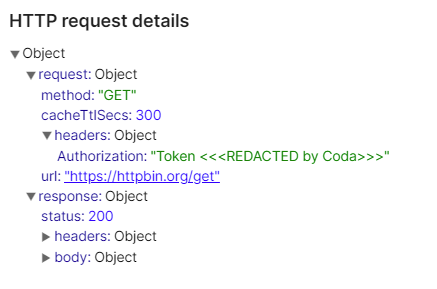
Give that code a try and see if you are seeing the same behavior.
I’ll try it out, thanks a lot
Andrey
чт, 7 июл. 2022 г. в 16:07, Eric Koleda via Coda Maker Community <notifications@coda1.discoursemail.com>:
It worked with addFormula but addSyncTable still doesn’t work for same reason, it doesn’t add custom header and returns 403 error because of it
is it any specific thing that i should do about addSyncTable that I miss? maybe you can give an advice how it works with authorization? sorry for hurry, got to complete the taks
пт, 8 июл. 2022 г. в 01:20, Андрей Сухов <andreysukhov90@gmail.com>:
I’m seeing it work fine in sync table as well:
import * as coda from "@codahq/packs-sdk";
export const pack = coda.newPack();

pack.addNetworkDomain("httpbin.org");

pack.setUserAuthentication({
  type: coda.AuthenticationType.CustomHeaderToken,
  headerName: "Authorization",
  tokenPrefix: "Token",
});

const MySchema = coda.makeObjectSchema({
  properties: {
    json: { type: coda.ValueType.String },
  },
  displayProperty: "json", // Which property above to display by default.
  idProperty: "json", // Which property above is a unique ID.
});

pack.addSyncTable({
  name: "MyTable",
  description: "",
  identityName: "Thing",
  schema: MySchema,
  formula: {
    name: "SyncThings",
    description: "",
    parameters: [],
    execute: async function ([], context) {
      let response = await context.fetcher.fetch({
        method: "GET",
        url: "https://httpbin.org/get",
      });
      let data = response.body;
      let json = JSON.stringify(data, null, 2);
      return {
        result: [{json: json}],
      };
    },
  },
});

Maybe it’s worth starting with code like that and then adapting it to your API?
Tried this, and it worked, many thanks to you!
вс, 10 июл. 2022 г. в 03:37, Eric Koleda via Coda Maker Community <notifications@coda1.discoursemail.com>: