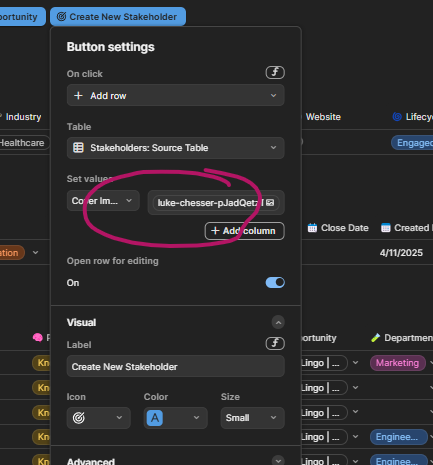
Riddle me this. I have a button for several different things. Mainly to add new rows to existing tables. All buttons are forcing the ‘cover image’ value for card views. You can see it in the image (this worked for the last several months and now it’s not) and you can see the missing cover image from the second image. I deleted the button, re-added it, and same thing. It no longer forces the cover image.
Related topics
| Topic | Replies | Views | Activity | |
|---|---|---|---|---|
| Launched: Stunning row detail views | 49 | 3931 | September 24, 2021 | |
| Cover image should not take up any space on Card View if no images are assigned to the card | 7 | 1226 | April 29, 2020 | |
|
Attach Image Button
|
6 | 1315 | September 12, 2020 | |
|
Stacked images with button formula
|
4 | 138 | December 21, 2024 | |
|
How to always show cover picture when changing page
|
2 | 457 | September 4, 2022 |

